AMR and Virulence Factors
Overview
After preparing the eight assembly files, we can screen the genomes for antimicrobial resistance genes and virulence factors.
In this lesson, we will use ABRicate to screen assembly FASTA files against two databases:
ncbifor antimicrobial resistance genesvfdbfor virulence factor genes
Learning objectives
By the end of this lesson, you should be able to:
- activate the
amrenvironment - create an output directory for ABRicate results
- run
ABRicateon multiple assembly files - identify antimicrobial resistance genes
- identify virulence factor genes
- summarise ABRicate results across samples
Input files
In the previous lesson, we copied eight filtered assembly files into the assemblies directory.
Check that the files are present:
ls assembliesYou should see files such as:
S1_contigs_filtered.fasta
S2_contigs_filtered.fasta
S3_contigs_filtered.fasta
S4_contigs_filtered.fasta
S5_contigs_filtered.fasta
S6_contigs_filtered.fasta
S7_contigs_filtered.fasta
S8_contigs_filtered.fasta
Count the number of assembly files:
ls assemblies/*_contigs_filtered.fasta | wc -lThe expected number is:
8For this lesson, we will screen all filtered assembly files:
assemblies/*_contigs_filtered.fastaActivate the AMR environment
Activate the amr environment:
conda activate amrCheck that ABRicate is available:
abricate --versionYou will see:
abricate 1.4.0Check available ABRicate databases:
abricate --listExample ABRicate database list
After running:
abricate --listyou may see output like this:
DATABASE        SEQUENCES  DBTYPE  DATE
ecoli_vf        2701       nucl    2026-Apr-3
ncbi            8232       nucl    2026-Apr-3
vfdb            4592       nucl    2026-Apr-3
argannot        2224       nucl    2026-Apr-3
upec_expec_vf   77         nucl    2026-Apr-3
resfinder       3206       nucl    2026-Apr-3
card            6052       nucl    2026-Apr-3
plasmidfinder   488        nucl    2026-Apr-3
bacmet2         746        prot    2026-Apr-3
ecoh            597        nucl    2026-Apr-3
victors         4545       nucl    2026-Apr-3
megares         6635       nucl    2026-Apr-3
Interpreting the database list
| Column | Meaning |
|---|---|
DATABASE |
Name of the ABRicate database |
SEQUENCES |
Number of sequences in the database |
DBTYPE |
Database type, usually nucleotide (nucl) or protein (prot) |
DATE |
Date when the database was last updated |
For this lesson, we will mainly use:
| Analysis | Database |
|---|---|
| AMR gene screening | ncbi |
| Virulence factor screening | vfdb |
| Plasmid screening | plasmidfinder |
Create output directory
Create a directory named abricate:
mkdir -p abricateCheck that the directory was created:
lsyou will see:
abricate
annotation
assemblies
classify
Run ABRicate for AMR genes
Run ABRicate using the ncbi database:
abricate \
  --db ncbi \
  --threads 4 \
  assemblies/*_contigs_filtered.fasta \
  > abricate/amr.tsv
Understanding the AMR command
| Option | Meaning |
|---|---|
abricate |
Runs ABRicate |
--db ncbi |
Uses the NCBI AMR database |
--threads 4 |
Uses 4 CPU threads |
assemblies/*_contigs_filtered.fasta |
Screens all filtered assembly files |
> |
Redirects output to a file |
abricate/amr.tsv |
AMR output table |
Check AMR output
Check that the output file was created:
ls abricateOutput:
amr.tsvView the first few lines:
head abricate/amr.tsvOpen abricate/amr.tsv.
Which AMR genes are detected in sample S1?
Summarise AMR results
Create a summary table for AMR genes:
abricate --summary abricate/amr.tsv > abricate/amr_summary.tsvls abricateOutput:
amr.tsv amr_summary.tsvView the summary:
cat abricate/amr_summary.tsvyou may see output like this:
#FILE                                   NUM_FOUND  almE    almF    almG    catB9   dfrA1   dfrA31  qnrVC5  varG
assemblies/S1_contigs_filtered.fasta    5          100.00  100.00  100.00  100.00  .       .       .       100.00
assemblies/S2_contigs_filtered.fasta    5          100.00  100.00  100.00  .       .       100.00  100.00  .
assemblies/S3_contigs_filtered.fasta    6          100.00  100.00  100.00  100.00  100.00  .       .       100.00
assemblies/S4_contigs_filtered.fasta    5          100.00  100.00  100.00  100.00  .       .       .       100.00
assemblies/S5_contigs_filtered.fasta    3          100.00  100.00  100.00  .       .       .       .       .
assemblies/S6_contigs_filtered.fasta    4          100.00  100.00  100.00  .       .       .       .       100.00
assemblies/S7_contigs_filtered.fasta    4          100.00  100.00  100.00  .       .       .       .       100.00
assemblies/S8_contigs_filtered.fasta    5          100.00  100.00  100.00  100.00  .       .       .       100.00
Interpreting the AMR summary
Each row represents one genome assembly.
Each column after NUM_FOUND represents an AMR-associated gene detected by ABRicate.
| Column | Meaning |
|---|---|
#FILE |
Input assembly file |
NUM_FOUND |
Number of AMR genes detected in that assembly |
| Gene columns | Percentage identity or coverage reported for each detected gene |
. |
Gene was not detected in that assembly |
In this example, all samples contain:
almE
almF
almG
These genes were detected at 100.00 in all eight assemblies.
Summary of AMR gene presence
| Sample | Number of genes detected | Genes detected |
|---|---|---|
S1 |
5 | almE, almF, almG, catB9, varG |
S2 |
5 | almE, almF, almG, dfrA31, qnrVC5 |
S3 |
6 | almE, almF, almG, catB9, dfrA1, varG |
S4 |
5 | almE, almF, almG, catB9, varG |
S5 |
3 | almE, almF, almG |
S6 |
4 | almE, almF, almG, varG |
S7 |
4 | almE, almF, almG, varG |
S8 |
5 | almE, almF, almG, catB9, varG |
Questions
Which sample has the highest number of AMR genes detected?
We can also visualize the amr_summary.tsv in a heatmap using a custop python/R script.
We will share the script with you later this training session so you can understand how to visualize an AMR dataset
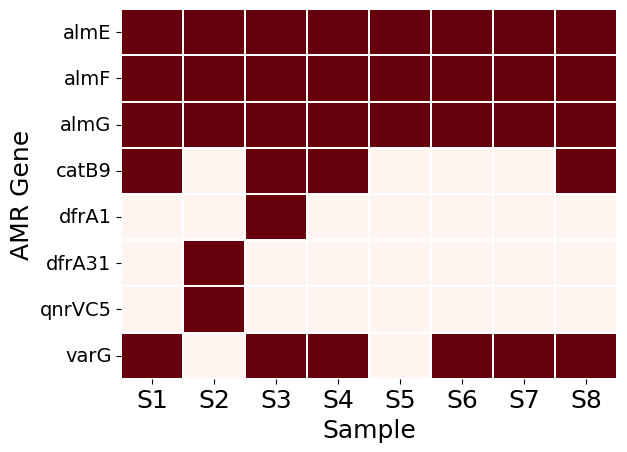
Which AMR genes are found in all eight samples?
Which sample contains qnrVC5?
Which samples contain catB9?
Run ABRicate for virulence factors
Run ABRicate using the vfdb database:
abricate \
  --db vfdb \
  --threads 4 \
  assemblies/*_contigs_filtered.fasta \
  > abricate/vf.tsv
Understanding the virulence factor command
| Option | Meaning |
|---|---|
--db vfdb |
Uses the virulence factor database |
assemblies/*_contigs_filtered.fasta |
Screens all filtered assembly files |
abricate/vf.tsv |
Virulence factor output table |
Check virulence factor output
View the first few lines:
ls abricateYou should now have:
amr.tsv
amr_summary.tsv
vf.tsv
View the first few lines:
head abricate/vf.tsvyou may see output like this:
#FILE   SEQUENCE    START   END STRAND  GENE    COVERAGE    COVERAGE_MAP    GAPS    %COVERAGE   %IDENTITY   DATABASE    ACCESSION   PRODUCT RESISTANCE
assemblies/S1_contigs_filtered.fasta    NODE_15_length_78481_cov_84.780315  182 556 -   ctxB    1-375/375   =============== 0/0 100.00  99.47   vfdb    WP_000593522    (ctxB) cholera enterotoxin B subunit [CT (VF0128) - Exotoxin (VFC0235)] [Vibrio cholerae O1 biovar El Tor str. N16961]
assemblies/S1_contigs_filtered.fasta    NODE_15_length_78481_cov_84.780315  553 1329    -   ctxA    1-777/777   =============== 0/0 100.00  100.00  vfdb    WP_001881225    (ctxA) cholera enterotoxin A subunit [CT (VF0128) - Exotoxin (VFC0235)] [Vibrio cholerae O1 biovar El Tor str. N16961]
assemblies/S1_contigs_filtered.fasta    NODE_15_length_78481_cov_84.780315  1428    2627    -   zot 1-1200/1200 =============== 0/0 100.00  100.00  vfdb    WP_000021616    (zot) zona occludens toxin [Zot (VF0129) - Exotoxin (VFC0235)] [Vibrio cholerae O1 biovar El Tor str. N16961]
assemblies/S1_contigs_filtered.fasta    NODE_15_length_78481_cov_84.780315  2624    2917    -   ace 1-294/294   =============== 0/0 100.00  100.00  vfdb    WP_000979342    (ace) accessory cholera enterotoxin [Ace (VF0130) - Exotoxin (VFC0235)] [Vibrio cholerae O1 biovar El Tor str. N16961]
assemblies/S1_contigs_filtered.fasta    NODE_15_length_78481_cov_84.780315  56878   58047   +   cqsA    1-1170/1170 =============== 0/0 100.00  99.92   vfdb    WP_001039912    (cqsA) CAI-1 autoinducer synthase [CAI-1 (VF0405) - Biofilm (VFC0271)] [Vibrio cholerae O1 biovar El Tor str. N16961]
assemblies/S1_contigs_filtered.fasta    NODE_17_length_73937_cov_105.952587 16160   18172   +   mshH    1-2013/2013 ========/====== 2/2 99.95   99.85   vfdb    WP_164923315    (mshH) MSHA biogenesis protein MshH [MSHA pili (VF0515) - Adherence (VFC0001)] [Vibrio cholerae O1 biovar El Tor str. N16961]
assemblies/S1_contigs_filtered.fasta    NODE_17_length_73937_cov_105.952587 18185   19624   +   mshI    1-1440/1440 =============== 0/0 100.00  100.00  vfdb    WP_000743253    (mshI) MSHA biogenesis protein MshI [MSHA pili (VF0515) - Adherence (VFC0001)] [Vibrio cholerae O1 biovar El Tor str. N16961]
assemblies/S1_contigs_filtered.fasta    NODE_17_length_73937_cov_105.952587 19621   20271   +   mshJ    1-651/651   =============== 0/0 100.00  100.00  vfdb    WP_000835144    (mshJ) MSHA biogenesis protein MshJ [MSHA pili (VF0515) - Adherence (VFC0001)] [Vibrio cholerae O1 biovar El Tor str. N16961]
assemblies/S1_contigs_filtered.fasta    NODE_17_length_73937_cov_105.952587 20264   20581   +   mshK    1-318/318   =============== 0/0 100.00  100.00  vfdb    WP_000252812    (mshK) MSHA biogenesis protein MshK [MSHA pili (VF0515) - Adherence (VFC0001)] [Vibrio cholerae O1 biovar El Tor str. N16961]
Interpreting the virulence factor result
Each row represents one virulence factor hit detected in the assembly.
| Column | Meaning |
|---|---|
#FILE |
Input assembly file |
SEQUENCE |
Contig where the virulence gene was detected |
START |
Start position of the hit on the contig |
END |
End position of the hit on the contig |
STRAND |
DNA strand of the hit, either + or - |
GENE |
Virulence-associated gene detected |
%COVERAGE |
Percentage of the reference gene covered by the hit |
%IDENTITY |
Percentage identity between query and reference |
DATABASE |
Database used for screening |
PRODUCT |
Description of the detected virulence factor |
Key virulence genes detected in this example
| Gene | Product or role |
|---|---|
ctxB |
Cholera enterotoxin B subunit |
ctxA |
Cholera enterotoxin A subunit |
zot |
Zona occludens toxin |
ace |
Accessory cholera enterotoxin |
cqsA |
CAI-1 autoinducer synthase |
mshH |
MSHA biogenesis protein MshH |
mshI |
MSHA biogenesis protein MshI |
mshJ |
MSHA biogenesis protein MshJ |
mshK |
MSHA biogenesis protein MshK |
Interpretation
In this example, sample S1 contains several important virulence-associated genes.
The genes:
ctxA
ctxB
zot
ace
are located on the same contig:
NODE_15_length_78481_cov_84.780315These genes are associated with cholera toxin and related toxin elements.
The genes:
mshH
mshI
mshJ
mshK
are located on another contig:
NODE_17_length_73937_cov_105.952587These genes are associated with MSHA pili, which are involved in adherence.
Which cholera toxin genes are detected in this example?
Which genes are found on NODE_15_length_78481_cov_84.780315?
Which virulence genes are associated with MSHA pili in this example?
Which database was used for this virulence factor screening?
Summarise virulence factor results
Create a summary table for virulence factor genes:
abricate --summary abricate/vf.tsv > abricate/vf_summary.tsvView the summary:
head abricate/vf_summary.tsvWe will not understand by simply viewing the file using head command in terminal since the file is very large. So will download –> filter –> organize –> visualize.
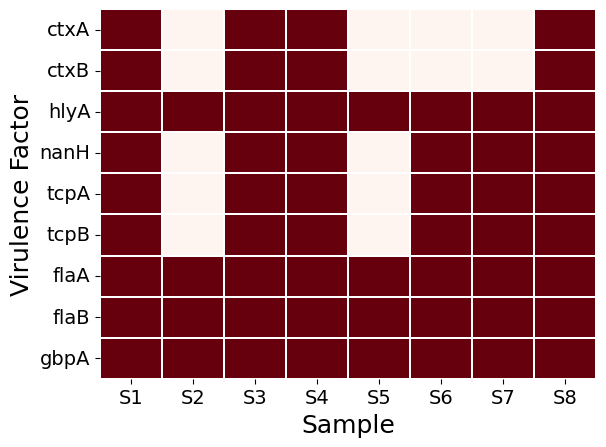
Now we will deactivate the environment
conda deactivateDownload ABRicate results from the server
If you are working on a remote server, download the annotation folder to your local computer.
From your local desktop terminal, run:
scp -r genomevm@172.28.28.12:~/tanzim/abricate .scp -r genomevm@172.28.28.12:~/tanzim/`abricate` .If you are working on a remote server, download the ABRicate results to your local computer.
From your local desktop terminal, run:
scp -r genomevm@172.28.28.12:~/tanzim/abricate/*summary.tsv .scp -r genomevm@172.28.28.12:~/tanzim/abricate/`*summary.tsv` .Final directory structure
At the end of this lesson, your directory should look like this:
.
├── assemblies
│   ├── S1_contigs_filtered.fasta
│   ├── S2_contigs_filtered.fasta
│   ├── S3_contigs_filtered.fasta
│   ├── S4_contigs_filtered.fasta
│   ├── S5_contigs_filtered.fasta
│   ├── S6_contigs_filtered.fasta
│   ├── S7_contigs_filtered.fasta
│   └── S8_contigs_filtered.fasta
└── abricate
    ├── amr.tsv
    ├── amr_summary.tsv
    ├── vf.tsv
    └── vf_summary.tsv
Practical exercise
Complete the following tasks:
- Activate the
amrenvironment. - Run ABRicate using the
ncbidatabase. - Save the output as
abricate/amr.tsv. - Run ABRicate using the
vfdbdatabase. - Save the output as
abricate/vf.tsv. - Create summary files for both results.
- Compare AMR and virulence factor profiles across the eight samples.
Create a small table in your notes:
| Sample | AMR genes detected | Virulence factors detected | Comment |
|---|---|---|---|
| S1 | |||
| S2 | |||
| S3 | |||
| S4 | |||
| S5 | |||
| S6 | |||
| S7 | |||
| S8 |
Use:
abricate/amr_summary.tsv
abricate/vf_summary.tsv
to fill in the table.
Optional: plasmid screening
If a plasmid database is available in your ABRicate installation, you can also screen for plasmid-associated sequences.
First, check available databases:
abricate --listIf plasmidfinder is available, run:
abricate \
  --db plasmidfinder \
  --threads 4 \
  assemblies/*_contigs_filtered.fasta \
  > abricate/plasmid.tsv
Create a summary:
abricate --summary abricate/plasmid.tsv > abricate/plasmid_summary.tsvOnly run plasmid screening if the required database is installed and available in abricate --list.
Key points
ABRicatescreens genome assemblies against gene databases.- The
ncbidatabase can be used for AMR gene screening. - The
vfdbdatabase can be used for virulence factor screening. - Summary files make it easier to compare results across multiple samples.
- The output files are stored in the
abricatedirectory.
Next step
In the next lesson, we will use annotation files to perform pangenome analysis.